BLU2Pro & BLU2Lite Troubleshooting Guide
BLU2 Troubleshooting Guide
Common issues and solutions for BLU2Pro and BLU2Lite with all supported cameras.
Connection Issues
BLU2 searches but never connects
- Make sure the camera is powered on and has Bluetooth enabled.
- If you have never paired before, both BLU2 and the camera must be in pairing mode. See the pairing guide for your camera: GoPro | DJI | Insta360 | Canon | Sony
- If you have paired before but BLU2 is not reconnecting, try re-pairing: put both devices into pairing mode again.
- Make sure the camera is not connected to your phone. Most cameras only allow one Bluetooth connection at a time. Close the camera's companion app on your phone or disable Bluetooth on your phone temporarily.
First connection of the day is slow
This is normal, especially for GoPro cameras. After 8 hours of inactivity, cameras enter a deep sleep state that takes longer to wake from. The HERO8 and HERO9 are the slowest to wake. For the best experience, turn your camera on and let it reach standby before heading to the aircraft or exit point.
Insta360 takes a long time to connect
Insta360 cameras can take up to 20 seconds to complete the Bluetooth connection. This is normal behavior for these cameras. BLU2 will continue searching during this time. Do not re-enter pairing mode or restart BLU2 while waiting.
BLU2 connected before but now won't reconnect
- Try a battery pull. NOT JUST POWER CYCLE. The battery pull is needed to fully reboot the camera.
- Try re-pairing: put both devices into pairing mode.
- Make sure no other device (phone, tablet) is connected to the camera via Bluetooth.
- If the camera has been factory reset, you will need to pair again.
LED Issues
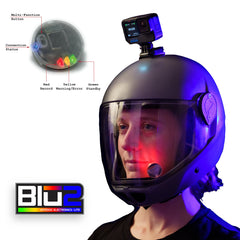
LEDs blink red/yellow then device shuts off
Battery is depleted.
- BLU2Pro: Recharge via USB-C.
- BLU2Lite: Replace the CR2032 battery.
LEDs show yellow warning while connected
A yellow flashing warning means the camera is reporting a condition that needs attention:
- Low battery — Camera battery below 15%. Charge or replace camera battery soon.
- Low storage — Less than approximately 3.5 GB remaining (4.5 GB for Insta360). Swap or clear the SD card.
- Temperature — Camera is too hot or too cold. Allow the camera to cool down or warm up.
Note: Not all cameras report all warning types. Canon cameras do not send status information. Sony cameras do not send battery, storage, or temperature. See the Camera Support Matrix for details.
LEDs show solid yellow
An error state means the camera cannot record:
- Camera battery is dead (0%)
- No SD card inserted
- SD card is full
- Camera is overheated and has shut down recording
Camera-Specific Issues
GoPro: Camera continuously reboots
Some GoPro firmware versions can enter a reboot loop. To fix: create an empty file named factory_reset.txt on the camera's SD card, insert it, and power the camera on. The camera will reset its settings to factory defaults.
GoPro HERO5/6: Camera battery drains faster with BLU2
The HERO5 and HERO6 keep the WiFi transmitter active whenever Bluetooth is connected. This is a limitation of those camera models and causes faster battery drain. HERO7 and newer models are not affected.
DJI: PIN prompt during pairing
This is normal. Enter 1234 when the camera displays the PIN prompt. This only happens during the first pairing; reconnections are automatic.
REVL system shows connection issues
REVL QR codes that include the "W0" parameter disable wireless on the camera. Either use REVL codes without the "W0" wireless-off option, or use compatible QR codes that leave wireless enabled.
Firmware Updates
Many issues are resolved by updating to the latest firmware. Update using the free BLU2 Updater app:


Still Need Help?
Contact us with a description of your issue, your camera model, and your BLU2 firmware version (shown in the updater app).