GoPro Pairing Guide
This guide covers pairing and using your BLU2 (BLU2Pro or BLU2Lite) with GoPro cameras. BLU2 supports HERO5 through HERO13 Black, MAX, and MAX 2.
Before You Start
- Make sure BLU2 is awake and next to the camera. (shake it or press the button).
- Ensure your GoPro is not connected to the QuikApp or a different remote. In other words, close out GoPro QuikApp on your phone.
Pairing Steps
- Turn on your GoPro and set it to the mode you want as your default (typically Video). The mode the camera is in when you pair becomes the default mode.
- Put your GoPro into Bluetooth pairing mode using the instructions for your model below.
- Put BLU2 into pairing mode: hold the button for 7 seconds until the LEDs flash yellow and blue.
- The devices will connect automatically. The camera status LEDs will show green or blue (standby) when connected.
Tip: If BLU2 falls asleep during pairing, shake it to wake it up. It will resume searching automatically.
HERO12 Black, HERO13 Black, MAX 2
- Swipe down from the top of the screen
- Slide right to access settings
- Tap Pair Device
- The camera automatically enters pairing mode (shown as "Quik App" connection)
- Press the Mode button to exit the menu after pairing completes
HERO11 Black
- Swipe down from the top of the screen
- Slide right to access settings
- Tap Preferences
- Tap Wireless Connections
- Tap Connect Device
- Select GoPro Quik App
HERO11 Mini
- With the Camera powered down, press and hold the mode button until the Bluetooth logo appears on the OLED display. Release the button.
OR
- Press the Mode button to power on
- Press Mode twice to reach preferences
- Press the Shutter button to select
- Press Shutter again to enter pairing
- Press Mode to start the pairing process
HERO9 Black, HERO10 Black
- Swipe down from the top of the screen
- Slide right to access settings
- Tap Connections
- Tap Connect Device
- Select GoPro Quik App
HERO7 Black, HERO8 Black, MAX
- Swipe down from the top of the screen
- Tap Preferences
- Tap Connections
- Tap Connect Device
- Select GoPro App
HERO6 Black
- Swipe down from the top of the screen
- Tap Connections
- Tap Connect New Device
- Select GoPro App
HERO5 Black
- Swipe down from the top of the screen
- Tap Connect
- Tap Connect New Device
- Select GoPro App
HERO5 Session
- Power on with the Mode button
- Repeatedly press Mode until you reach Connection Settings
- Press the Shutter button to select
- Toggle to Connect New Device
- Press Shutter to select
- Move to the checkmark and select GoPro App
What to Expect After Pairing
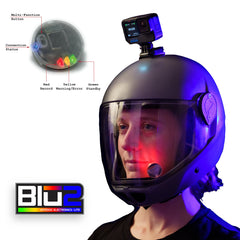
Once connected, BLU2 shows your camera's status in real time:
- Standby: LEDs show green (BLU2Lite) or blue (BLU2Pro)
- Recording: LEDs show red
- Low battery warning: Yellow flashing when camera battery drops below 15%
- Low storage warning: Yellow flashing when less than ~3.5 GB remains on the SD card
- Temperature warning: Yellow flashing if camera reports high or low temperature
- Error: Solid yellow if camera cannot record (dead battery, no card, card full, overheated)
Daily Use
After the initial pairing, BLU2 remembers your GoPro. For daily use:
- Turn on your GoPro.
- Wake BLU2 by shaking it or pressing the button.
- BLU2 will find your camera and connect automatically. No need to re-pair.
For the best experience, let your GoPro finish booting to standby before your first jump of the day. The first connection of the day is always the slowest because GoPro cameras enter a deep sleep after 8 hours of inactivity. This is also a good practice to get into to ensure you have a cleared card and a charged battery.
Switching Cameras
To use a different GoPro (or a different camera brand entirely), simply put both devices into pairing mode. BLU2 will pair with the new camera and automatically detect the camera type.
Good to Know
- HERO8 and HERO9 are slow to wake. These models take the longest to boot from deep sleep. Give them extra time on the first connection of the day.
- HERO11 Black/Mini first boot. The first connection after powering on can be slower than subsequent connections.
- HERO5 and HERO6 camera battery drain. These older models keep the WiFi transmitter active when Bluetooth is connected, which drains the camera battery faster. HERO7 and newer are not affected.
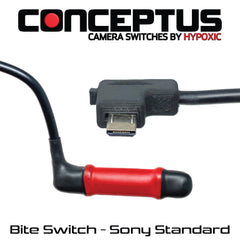
- BLU2Pro 2.5mm jack. On the BLU2Pro, a connected bite switch, tongue switch, or other remote trigger cable can start and stop recording hands-free.