Insta360 Pairing Guide
This guide covers pairing and using your BLU2 (BLU2Pro or BLU2Lite) with Insta360 cameras. BLU2 supports the X2, X3, X4, X5, Ace, Ace Pro, and Ace Pro 2.
Before You Start
- Turn on your Insta360 camera and set it to the mode you want as your default (typically Video). The mode the camera is in when you pair becomes the default mode.
- Make sure BLU2 is awake (shake it or press the button).
- Disconnect from your phone first. If the Insta360 app is connected to the camera on your phone, BLU2 will not be able to connect. Close the Insta360 app or turn off Bluetooth on your phone before pairing.
- The nearest Insta360 camera will be discoverable automatically. It's best to do this away from many other cameras.
Pairing Steps
- Put BLU2 into pairing mode: hold the button for 7 seconds until the LEDs flash yellow and blue.
- Confirm the "Connect to app" Dialog within 15 seconds.
- It should connect immediately from there.
Connection Takes Up to 20 Seconds
Insta360 cameras take longer to turn on the Bluetooth and start the connection than other brands. BLU2 will continue showing the searching pattern (blue LED) during this time and then show it's connecting for several seconds (fast flashing blue). This is completely normal. Do not re-enter pairing mode, restart BLU2, or restart the camera while waiting.
What to Expect After Pairing
Once connected, BLU2 shows your camera's full status in real time:
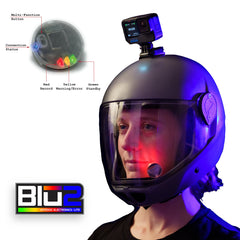
- Standby: LEDs show green (BLU2Lite) or blue (BLU2Pro)
- Recording: LEDs show red
- Low battery warning: Yellow flashing when camera battery is low
- Low storage warning: Yellow flashing when less than ~4.5 GB remains on the SD card
- Temperature warning: Yellow flashing if camera gets too hot or too cold
- Error: Solid yellow if camera cannot record (dead battery, no card, card full, overheated)
Daily Use
After the initial pairing, BLU2 remembers your Insta360 camera. For daily use:
- Make sure the Insta360 app on your phone is not connected to the camera (close the app or turn off phone Bluetooth).
- Turn on your Insta360 camera.
- Wake BLU2 by shaking it or pressing the button.
- BLU2 will find your camera and connect automatically. Allow up to 20 seconds.
Switching Cameras
To use a different Insta360 camera (or a different camera brand entirely), simply follow the instructions again. BLU2 will pair with the new closer in proximity camera and automatically detect the camera type.
Good to Know
- Only one Bluetooth connection at a time. If your phone is connected to the camera via the Insta360 app, BLU2 cannot connect. This is the most common cause of connection issues with Insta360 cameras.
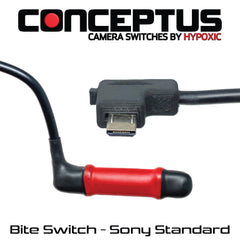
- BLU2Pro 2.5mm jack. On the BLU2Pro, a connected bite switch, tongue switch, or other remote trigger cable can start and stop recording hands-free.